

Guide to good office lighting – light level, glare, daylight and lighting control
Good office lighting is about more than just providing sufficient light at your desk. It should make working comfortable, reduce annoying glare and create a good visual environment. At the same time, the lighting should be flexible, energy-efficient and adapted to how the premises are used.
In modern office buildings, daylight, artificial lighting and lighting control must work together. This guide explains what characterizes good office lighting, what requirements and recommendations apply, and how different lighting solutions can contribute to a better working environment.
In short
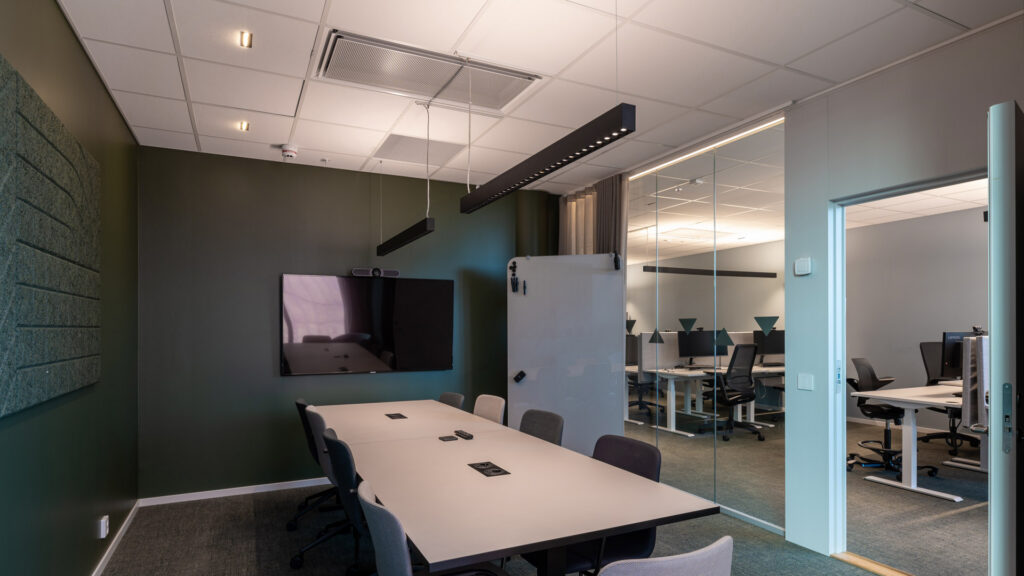
Good office lighting requires the right light level, good glare control and a balanced distribution of light in the room. For normal reading, writing and PC work, 500 lux is a key reference level, but the light level alone does not determine the quality. Daylight, individual adaptation and demand management are important for both visual comfort and energy-efficient operation.
What characterizes good office lighting?
An office is used for many different activities. The workday can consist of concentrated screen work, meetings, reading, phone calls and collaboration with colleagues. These activities place different demands on the lighting.
At the desk, we need enough light to read documents and perform work tasks without strain. In meeting rooms, it is important to see faces and body language, while presentations and screens should be clear. In common areas, lighting should also contribute to orientation, well-being and a good room experience.
A good solution therefore combines several types of lighting:
- Task lighting provides sufficient light for tasks performed at desks and other work surfaces.
- General lighting creates a balanced lighting environment and makes it easy to orient yourself in the room.
- Indirect and vertical lighting illuminates walls, ceilings and people and helps make the room feel bright and comfortable.
- Decorative lighting can highlight architecture, materials and interiors and give a room character.
The goal is not necessarily to make the entire room equally bright. A well-thought-out combination of different light sources and light levels can create a more comfortable and functional working environment than a uniform solution.
How much light do you need in an office?
Illuminance is measured in lux (lx) and describes how much light falls on a surface. The level of light required depends on the task and the user's needs.
For indoor workplaces, NS-EN 12464-1:2021 and Lyskultur's Luxtabell 1B are key professional references.
Recommended light levels for office work
The table shows selected values from Lyskultur's Luxtabell 1B, based on NS-EN 12464-1:2021.
| Area or activity | Maintained illuminance | UGR limit |
|---|---|---|
| Reading, writing and computer work | 500 lux | 19 |
| Conference and meeting rooms | 500 lux | 19 |
| Archiving and copying | 300 lux | 19 |
| Reception desk | 300 lux | 22 |
The values apply to the defined work areas or activities, not necessarily the entire floor area. The standard also specifies other quality criteria, and higher lighting levels may be appropriate after assessing work tasks and user needs.
Work surface lighting is only part of the solution
An office can have 500 lux at the desk and still feel dark or uncomfortable. The reason may be large differences between the work area and the surroundings.
When planning, a distinction is made between the working field, the near field and the background area.
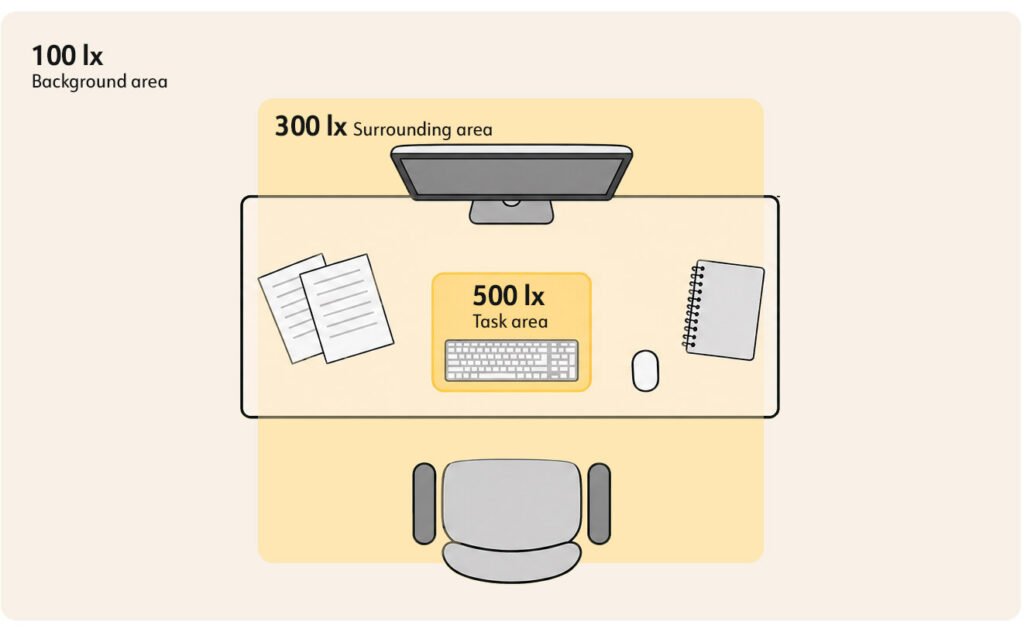
For a typical office workplace, Lyskultur describes, for example, 500 lux in the work area, 300 lux in the near field and 100 lux in the background area. In addition, there are specific requirements for, among other things, evenness and illumination of walls and ceilings.
Light walls and a well-lit ceiling can help make the entire room feel brighter, without necessarily increasing the lighting on the desk.
It is therefore important to consider how the light is distributed throughout the entire field of view, not just how many lux are measured on the work surface.
Blending – one of the most important challenges
Glare occurs when strong light sources or large light contrasts create discomfort or make it more difficult to see.
In office workplaces, glare can come directly from fixtures and windows, or indirectly through reflections in screens, glass surfaces and shiny tabletops.
A luminaire can deliver the right amount of light and at the same time be poorly suited to the workplace if it is incorrectly positioned or has insufficient shielding.
What does UGR mean?
UGR stands for Unified Glare Rating and is a method for assessing discomfort glare from electrical lighting fixtures in a room.
The lower the UGR value, the lower the calculated degree of discomfort glare.
For normal reading, writing and PC work, NS-EN 12464-1:2021 specifies a UGR limit of 19. Other work tasks may have different limit values.
It is important to be aware that UGR is not just a property of the luminaire itself. The calculated value also depends on the luminaire's location, the room's design, the surfaces and the user's viewing direction.
A luminaire marketed with a UGR below 19 does not automatically provide a solution that meets the glare requirements in all rooms. Read more about what UGR is and what the value tells you about glare .
How to reduce glare in the office?
Good glare control starts with choosing luminaires with suitable optics and shielding. Microprismatic diffusers and other solutions that limit the visibility of strong light sources may be relevant in workplaces.
The placement of the luminaires must also be considered in relation to the desk, screen location and viewing direction. Direct view of light sources and adverse reflections should be limited.
When working on a screen, it is particularly important to avoid large light contrasts between the screen and the surroundings.
Good glare control is therefore about product selection, lighting calculation and how workplaces are organized.
Daylight and artificial lighting must be planned together
Daylight is an important part of the visual work environment. It provides variety throughout the day, contributes to a natural circadian rhythm and, together with a view, provides contact with the surroundings.
At the same time, daylight availability varies with the season, time of day, weather conditions and the design of the building. In office buildings, large window surfaces can provide both abundant daylight and challenges with direct sunlight, glare and heat.
Good daylight planning is therefore about finding a balance between daylight access, views, solar shading and the need for electrical lighting.
Location of workplaces in relation to windows
Workplaces should be organized so that daylight is utilized without creating unnecessary reflections or contrasts.
For screen work, it is often beneficial to have windows to the side of the working direction. Bright daylight directly in front of the screen can create large contrasts, while windows behind the workplace can cause reflections in the screen.
Sun protection should be adjustable so that direct sunlight is limited when necessary, without reducing daylight and visibility more than necessary.
Daylight management reduces the need for artificial light
With daylight control, the electric lighting can be automatically dimmed down when daylight provides sufficient illumination.
In an office landscape with windows along the facade, workplaces near the windows will often have greater access to daylight than workplaces further into the room.
By dividing the lighting into zones, the light level can be adjusted according to the conditions in each part of the room.
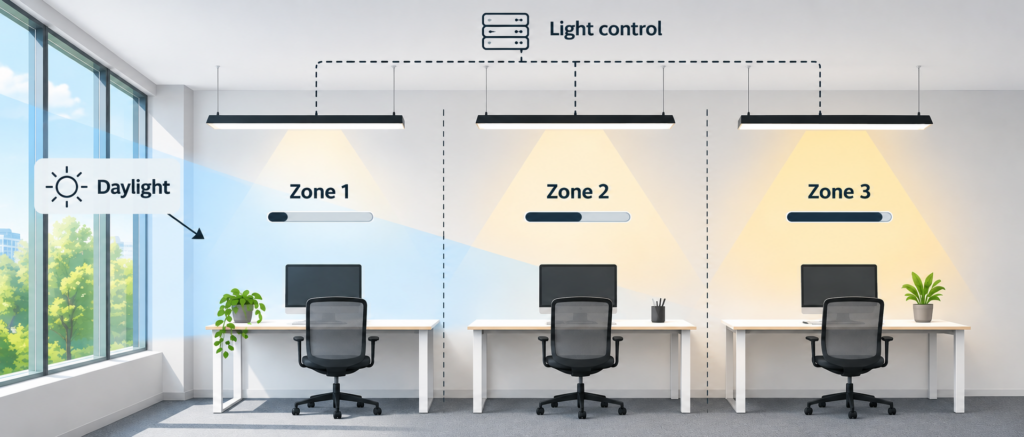
It is still important to avoid turning off the lighting completely in parts of a deep room if this creates unpleasant differences between light and dark zones.
The best result is achieved when daylight, solar shading and electric lighting are considered as parts of one overall solution.
Lighting adapted to different office areas
A modern office building often consists of several types of work and living areas. The solution should be adapted to how each area is used.
Cell offices and permanent workplaces
In cellular offices, the lighting can be adapted to the individual user.
A combination of good general lighting and an individual workplace luminaire provides flexibility. The user can adjust the light level at the desk as needed.
Suspended luminaires with both direct and indirect light can be a good alternative. The direct light component provides task lighting, while the indirect light component helps to illuminate the room and reduce large light contrasts.
Open office landscape
In open office environments, lighting must work for many workplaces at the same time. Furthermore, furniture placement may change over time.
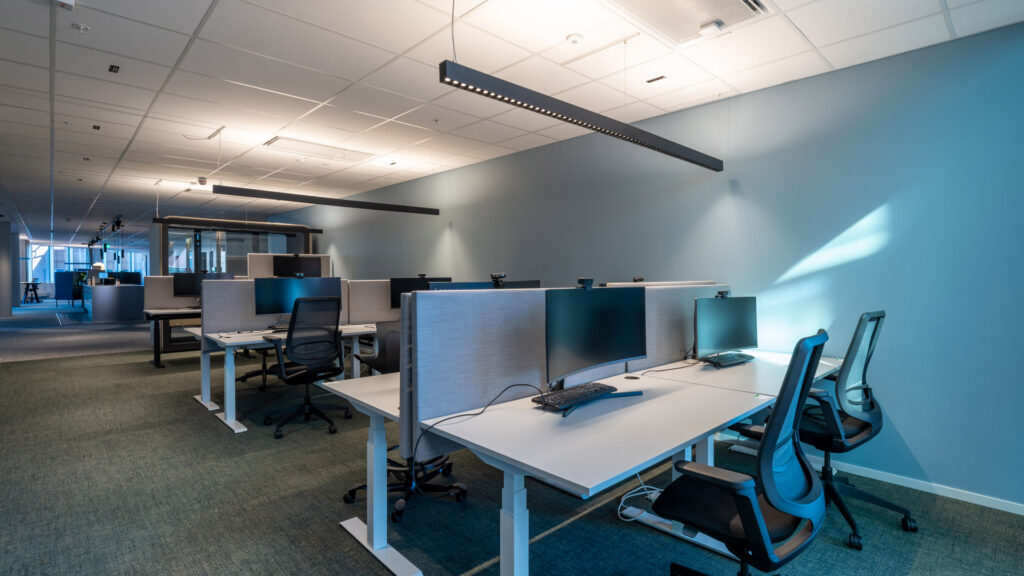
The lighting should therefore be flexible, have good glare control and provide a balanced light distribution.
LED Panels, linear fixtures and pendant fixtures can all be relevant, depending on the room's design and function.
A solution with uniform general lighting and individually adjustable task lighting may be appropriate when employees have different needs.
Meeting rooms and video conference rooms
In meeting rooms, lighting needs to work for multiple activities. During a meeting, participants need to be able to read documents and see each other clearly. During a presentation, there may be a need to reduce the light level at the screen without making the rest of the room dark.
During video conferences, it is especially important to have sufficient light on faces. Light that only comes from directly above can create strong shadows and make facial expressions harder to perceive.
A good solution therefore combines lighting on the meeting table with lighting of people and the surroundings.
With pre-programmed lighting scenes, users can easily switch between meetings, presentations and video conferences.
Reception, corridors and social zones
Common areas have different needs than traditional workplaces.
In reception areas and entrance areas, lighting should help with orientation and give a good first impression. In corridors, it is important to have smooth transitions and clear contrasts. In canteens and social zones, the lighting can often have a warmer and more varied expression.
Here, decorative fixtures, wall lighting and accent lighting can be combined with functional lighting.
A comprehensive lighting plan makes it possible to create variation between areas without the transition being felt uncomfortable.
Color temperature, color rendering and human-oriented lighting
The color temperature of light is described in Kelvin (K) and affects how we experience the lighting environment.
In office environments, 3000 K and 4000 K are common choices. Warmer light can create a cozier atmosphere, while more neutral white light is often used in work areas. The choice should be seen in the context of the interior, daylight and the desired room experience.
Color rendering is also important. It describes how natural colors appear in the light, and is often expressed as Ra or CRI. For normal office work, NS-EN 12464-1:2021 specifies a minimum value of Ra 80.
What is Human Centric Lighting?
Human Centric Lighting (HCL), also called human-oriented lighting, takes into account how light affects people, both visually and biologically.
Dynamic lighting can, for example, change light levels and color temperature throughout the day. The goal can be to support activity, visual comfort, and a natural circadian rhythm.
However, the effect depends on more than just the color temperature. The spectral composition, intensity, timing, and exposure time of the light are all important.
Dynamic lighting should therefore be considered as a possible supplement to a good basic lighting environment, not as a replacement for daylight or good ergonomic lighting. Read more about the principles behind Human Centric Lighting and how light affects people .
Lighting control makes office lighting more flexible
Modern lighting control makes it possible to adapt the lighting to both the users and how the premises are used throughout the day.
In a traditional facility, large parts of the office can be fully lit even when the workstations are empty. With demand control, the lighting can be regulated automatically.
Three key functions are:
- Presence control: The light is turned on, dimmed or turned off depending on whether an area is in use.
- Daylight control: The electric light is adjusted according to the amount of daylight available.
- Scene control and individual regulation: The user can choose the light level and lighting situation according to activity and needs.
These functions can be combined and adapted to different parts of the building.
Choose lighting control according to the building's needs
There are various solutions for lighting control, from simple local systems to comprehensive systems that integrate with the building's other technical installations.
DALI-based systems may be relevant where addressable control and integration with other building systems are desired. Wireless lighting control may be particularly interesting during renovations or where flexible installation without extensive new wiring is desired.
Norlux Wireless Connect is an example of a wireless system that can be used for dimming, grouping, sensor control and lighting customization.
The choice of solution should be based on the size of the building, existing installations, user needs and requirements for operation and integration.
Ease of use is crucial
An advanced lighting control system has little value if it is difficult to use.
In a meeting room, for example, it should be easy to select the right lighting with one clear button or an intuitive control panel.
Automatic functions should work without users having to deal with unnecessarily complicated settings.
Good lighting control is therefore not about having as many functions as possible, but about the right light at the right time – and easy operation when needs change.
Energy-efficient office lighting without compromising on light quality
Lighting is an important part of energy use in an office building. Modern LED -luminaires combined with needs-adapted control provide good opportunities to reduce energy consumption.
When renovating, replacing older fixtures can result in lower installed power and reduced maintenance requirements. With sensors and daylight control, energy consumption can be further reduced when the light does not need to be at full strength. In the article on how lighting control can reduce energy consumption, we explain which factors affect energy savings.
However, it is important to look at the overall solution.
A system with the lowest possible installed power is not necessarily the best if it leads to insufficient lighting, poor visual comfort or high contrasts in the room.
When evaluating solutions, one should also look at lifespan, possibilities for maintenance and replacement of components, the functionality of the control system and expected service life.
Energy consumption should be assessed over time, not just based on the luminaire's power in watts.
How to plan good office lighting
Good office lighting should be planned early in a construction or renovation project. When lighting is seen in the context of architecture, interior design and technical installations, it becomes easier to achieve both good light quality and a cost-effective solution.
A good planning process should include:
- Map out the use of the premises. Clarify which tasks will be performed, how the workplaces will be organized, and where flexibility is needed.
- Define lighting requirements. Consider light level, glare, uniformity, color rendering, daylight, and any special user needs.
- Choose lighting principles. Decide how task lighting, general lighting, indirect lighting and decorative elements will be combined.
- Plan your lighting control. Clarify your needs for zones, presence sensors, daylight control, individual controls and integration with other systems.
- Document and quality assure the solution. Lighting calculations, product documentation, checking luminaire placement and functional testing are important parts of the process.
A well-designed lighting system should function both upon handover and throughout the building's lifespan.
How Norlux can contribute
Norlux helps developers, property managers, architects, consultants and installers develop lighting solutions for new and existing office buildings.
We look at the entire project – from needs analysis, lighting design and lighting calculations to the selection of luminaires, lighting control and technical documentation.
The goal is a solution that takes into account the working environment, architecture, energy use and flexibility, and that works for both those who use the building and those who will operate it.
Frequently asked questions about office lighting
Are you planning a lighting project?
Norlux helps you find lighting solutions tailored to your project's needs – from lighting design and product selection to control and documentation.